
Download Kickv1.0 – AI‑Powered Bookkeeping, Real‑Time Finance Insights, Secure Cloud App
Kickv1.0 Overview: AI‑Driven Bookkeeping for Modern Businesses
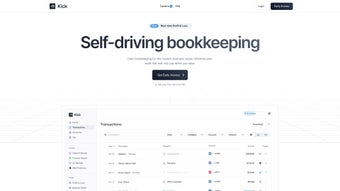
Kickv1.0 is a web‑based AI application that automates the most time‑consuming bookkeeping tasks for small‑ and medium‑size enterprises. By leveraging advanced machine‑learning algorithms, the platform continuously learns from your financial data, reducing manual entry, eliminating human error, and delivering instant, actionable insights. The subscription‑based service is built for businesses that want to streamline accounting without hiring a full‑time accountant or mastering complex software.
Its clean, intuitive dashboard makes it possible for anyone—from a solo freelancer to a growing startup—to monitor cash flow, categorize expenses, and generate professional‑grade reports with just a few clicks. Because it lives in the cloud, Kickv1.0 is always up‑to‑date, secure, and accessible from any device with an internet connection. In addition to core bookkeeping automation, the tool offers built‑in analytics that flag unusual spending patterns, predict cash‑flow shortages, and suggest budgeting adjustments based on historical trends.
This proactive approach helps decision‑makers act before problems become costly emergencies. The platform also respects strict data‑privacy regulations, employing end‑to‑end encryption, regular SOC‑2 audits, and GDPR‑compliant data handling, which makes it a trustworthy partner for businesses handling sensitive financial information. Whether you operate a boutique design studio, a tech‑focused SaaS company, or a retail chain with multiple locations, Kickv1.0 scales to meet your needs while keeping the user experience frictionless and the pricing transparent.
Key Benefits at a Glance
- Automatic data capture from bank feeds, receipts, and invoices.
- Real‑time financial dashboards that highlight profit margins, cash‑flow gaps, and expense trends.
- One‑click generation of balance sheets, income statements, and tax‑ready reports.
- Seamless integration with popular tools such as QuickBooks, Xero, Slack, and Zapier.
- Enterprise‑grade security with end‑to‑end encryption and regular SOC‑2 compliant audits.
Core Features That Power Your Financial Operations
- AI‑Assisted Data Entry: The engine reads PDFs, images, and CSV files, auto‑populating ledger entries and categorizing expenses with 96 % accuracy.
- Real‑Time Insight Engine: Dynamic charts update instantly as new transactions arrive, offering live visibility into profit, burn rate, and runway.
- Smart Reconciliation: Automatic matching of bank statements to recorded transactions, flagging anomalies for quick review.
- Multi‑Channel Integration: Connects to banking APIs, payment gateways (Stripe, PayPal), e‑commerce platforms (Shopify, WooCommerce), and ERP systems.
- Custom Reporting Templates: Build, save, and schedule PDF or Excel reports that align with internal KPI dashboards.
- Role‑Based Access Control: Assign view‑only, editor, or admin permissions to team members, ensuring data integrity.
- Automated Tax Prep: Generates tax‑ready summaries, tracks deductible expenses, and exports data directly to tax software.
- Continuous Learning: The AI improves categorization rules as you correct entries, reducing future corrections.
- Secure Cloud Hosting: Hosted on ISO‑27001 certified data centers with daily backups and GDPR compliance.
- Mobile‑Friendly Web App: Responsive design works flawlessly on smartphones and tablets for on‑the‑go bookkeeping.
- Audit Trail & Version History: Every change is logged with timestamps and user IDs, making internal audits and external compliance checks straightforward.
- Multi‑Currency Support: Handle transactions in over 30 currencies, with automatic exchange‑rate updates and consolidated reporting.
- Smart Alerts & Notifications: Configurable push or email alerts warn you of overdue invoices, low cash balances, or unusual expense spikes.
- API Access for Developers: A well‑documented REST API enables custom integrations, webhook triggers, and data export to BI tools.
Installation, Usage Instructions, and Compatibility
Getting Started – No Download Required
Kickv1.0 is a pure SaaS solution, which means there is nothing to install on your local machine. Follow these three steps to start automating your books:
- Create an Account: Visit kickv1.com, enter your business email, and choose a password. A verification email will confirm your identity.
- Connect Your Financial Sources: Use the built‑in wizard to link bank accounts, credit cards, and payment processors via secure OAuth. Upload any existing CSV or PDF statements for immediate import.
- Configure Your Dashboard: Select the financial metrics you care about, set up recurring expense categories, and invite team members with appropriate roles.
How to Use Kickv1.0 Effectively
Once the initial setup is complete, daily usage becomes a matter of a few minutes. The platform’s design encourages a “review‑once‑daily” habit that keeps books current without overwhelming you:
- Review Auto‑Captured Entries: The AI suggests categorizations; approve or edit as needed. Corrections are fed back to the learning engine to improve future accuracy.
- Monitor Real‑Time Dashboards: Use the top‑right “Insights” tab to watch cash‑flow alerts, profitability trends, and expense anomalies. You can filter by department, project, or client.
- Generate Reports: Click “Reports,” pick a template, set the date range, and download or schedule email delivery. Saved templates let you reuse the same layout for monthly board meetings.
- Collaborate: Comment on transactions, assign tasks to accountants, and export data for external audits. Role‑based permissions ensure that only authorized personnel can edit critical entries.
- Leverage Integrations: Sync data automatically with QuickBooks, Xero, or your ERP. Webhooks can push transaction updates to Slack or Microsoft Teams, keeping the whole organization informed.
Operating System Compatibility (itemprop="operatingSystem")
Because Kickv1.0 runs entirely in the browser, it is compatible with any modern operating system that supports HTML5 and JavaScript. Tested platforms include:
- Windows 10/11 (Edge, Chrome, Firefox)
- macOS 12+ (Safari, Chrome, Firefox)
- Linux distributions (Chrome, Firefox)
- Android 8+ (Chrome, native WebView)
- iOS 13+ (Safari, Chrome)
The responsive design ensures a seamless experience whether you are on a desktop, laptop, tablet, or smartphone. All data is stored securely in the cloud, so you never need to worry about local backups or version conflicts.
Pros and Cons, Frequently Asked Questions, and Expert Review
Pros
- Fully automated data entry reduces manual workload by up to 80 %.
- Real‑time insights help prevent cash‑flow crises before they happen.
- Cloud‑only architecture eliminates the need for costly hardware or IT maintenance.
- Extensive integrations with existing accounting ecosystems protect prior investments.
- Scalable subscription model grows with your business, from solo freelancers to 200‑employee firms.
- Multi‑currency and multi‑language support enable global operations.
- Robust audit trail satisfies internal controls and external regulatory requirements.
Cons
- Requires a reliable internet connection; offline access is limited.
- Initial AI learning curve may produce occasional mis‑classifications that need manual correction.
- Subscription cost can be higher than basic spreadsheet solutions for very small startups.
- Advanced customization (e.g., custom API endpoints) may require developer resources.
Frequently Asked Questions (FAQPage)
Is Kickv1.0 suitable for non‑accountants?
Absolutely. The interface is designed with a “no‑jargon” approach, offering visual cues, guided wizards, and context‑sensitive help tips that let anyone manage finances confidently.
How does Kickv1.0 ensure data security?
All data is encrypted at rest (AES‑256) and in transit (TLS 1.3). The platform undergoes quarterly penetration testing and complies with GDPR, CCPA, and SOC‑2 standards.
Can I integrate Kickv1.0 with my existing QuickBooks account?
Yes. A native QuickBooks connector syncs transactions bi‑directionally, allowing you to keep both systems aligned without duplicate entry.
What pricing plans are available?
Kickv1.0 offers three tiers: Starter ($29/month for up to 5 users), Growth ($79/month for up to 20 users), and Enterprise (custom pricing with dedicated support). All plans include unlimited transactions and automatic updates.
Is there a free trial?
A 14‑day free trial is available with no credit‑card requirement, giving you full access to every feature so you can evaluate ROI before committing.
Does Kickv1.0 support multi‑currency accounting?
Yes. The platform handles over 30 currencies, automatically applies daily exchange rates, and consolidates multi‑currency reports for global businesses.
Expert Review (review)
Kickv1.0 stands out in a crowded market by combining AI precision with an ultra‑intuitive UI. The automatic receipt parsing works faster than most competitors, and the real‑time dashboards provide the kind of actionable insight that CFOs crave. While the reliance on internet connectivity could be a drawback for remote field teams, the overall value proposition—time saved, errors reduced, and financial visibility increased—justifies the subscription cost for growing businesses. The multi‑currency engine and robust API make it future‑proof for enterprises planning international expansion, and the audit‑trail feature satisfies auditors without extra effort. In short, Kickv1.0 delivers a compelling blend of automation, analytics, and security that helps SMBs move from reactive bookkeeping to strategic finance management.
Conclusion: Transform Your Bookkeeping with Kickv1.0 Today
In an era where data moves faster than ever, businesses can no longer afford manual bookkeeping processes that drain resources and invite mistakes. Kickv1.0 offers a secure, cloud‑native, AI‑powered solution that automates the heavy lifting while keeping you in full control of your financial narrative. Whether you are a solo entrepreneur looking for a painless way to track expenses or a scaling startup that needs real‑time cash‑flow alerts, the platform adapts to your needs without demanding a steep learning curve.
Take advantage of the 14‑day free trial, explore the seamless integrations, and experience the confidence that comes from having accurate, up‑to‑date financial information at your fingertips. Start your free trial now and watch your bookkeeping workload shrink while your financial insight expands.






